



Payment links
Integration
Payment links are a convenient way to allow your customers to pay, without you needing to build a UI to select payment methods. They can be, for instance, added to invoices to make the payment process as smooth as possible. A payment link creates an order automatically once the customer pays through a payment link. Please note that this service has a fixed montly fee. Read more about activating payment links here.
Complete example
This is a complete example of how to create a payment link and share it with your customers. You can use this as a starting point for your integration. The process is as follows:
- Gather the payment link data
- Generate a JWT (token) from this data
- POST the JWT to the API to create the payment link
/** * We recommend using the jsonwebtoken package to generate * Json Web Tokens. You can install it with npm: * > npm install jsonwebtoken * More information can be found at * https://www.npmjs.com/package/jsonwebtoken */import jwt from "jsonwebtoken";import axios from "axios";
/** * Note: Please make sure to make these calls from your server, * and not from the client. This is to prevent your secret key * from being exposed to the public. */
// 1. Gather the payment link dataconst payload = {  "accessKey": "MY_ACCESS_KEY",  "description": "MY-ORDER-ID-123",  "currency": "EUR",  "amount": 99.99,  "locale": "et",  "expiresAt": "2025-03-05T14:48:00.000Z",  "notificationUrl": "https://mystore.domain/payments/notify",  "askAdditionalInfo": true};
// 2. Generate the tokenconst token = jwt.sign(payload, "MY_SECRET_KEY", {  algorithm: "HS256",  expiresIn: "10m", // this is only for the token, not the expiry of the payment link itself});
// console.log(token);// eyJhbGciOiJIUzI1NiIsInR5cCI6IkpXVCJ9.eyJhY2Nlc3NLZXkiOiJNWV9BQ0NFU1NfS0VZIiwiZGVzY3JpcHRpb24iOiJNWS1PUkRFUi1JRC0xMjMiLCJjdXJyZW5jeSI6IkVVUiIsImFtb3VudCI6OTkuOTksImxvY2FsZSI6ImV0IiwiZXhwaXJlc0F0IjoiMjAyNS0wMy0wNVQxNDo0ODowMC4wMDBaIiwibm90aWZpY2F0aW9uVXJsIjoiaHR0cHM6Ly9teXN0b3JlLmRvbWFpbi9wYXltZW50cy9ub3RpZnkiLCJhc2tBZGRpdGlvbmFsSW5mbyI6dHJ1ZSwiaWF0IjoxNzM1NDg4NDY0LCJleHAiOjE3MzU0ODkwNjR9.Citf04hOfRJR7P76g_xWDU1MDyqf5bVFvIIql8yhBD8
// 3. Send the token to the API and get the payment link URLaxios  .post("https://stargate.montonio.com/api/payment-links", {    data: token,  })  .then((response) => {    const { data } = response;    console.log(data.url);    // https://pay.montonio.com/payment-link-id  });
// Note: After successfully creating the payment link, you may now share it with your clients<?php/** * We recommend using Firebase's php-jwt package to generate * Json Web Tokens. You can install it with composer: * > composer require firebase/php-jwt * More information can be found at * https://github.com/firebase/php-jwt */
// If you are using composer remember you need to autoload files like this// require __DIR__ . '/vendor/autoload.php';
use \Firebase\JWT\JWT;
// 1. Gather the payment link data$payload = [ "accessKey" => "MY_ACCESS_KEY", "description" => "MY-ORDER-ID-123", "currency" => "EUR", "amount" => 99.99, "locale" => "et", "expiresAt" => "2025-03-05T14:48:00.000Z", "askAdditionalInfo" => true, "notificationUrl" => "https://mystore.domain/payments/notify"];
// add expiry to payment data for JWT validation. This is different from the expiry of the payment link itself!$payload['exp'] = time() + (10 * 60);
// 2. Generate the token using Firebase's JWT library$token = JWT::encode($payload, 'MY_SECRET_KEY', 'HS256');
// Remove this var_dump once you want the header (location) to work correctlyvar_dump($token);// eyJhbGciOiJIUzI1NiIsInR5cCI6IkpXVCJ9.eyJhY2Nlc3NLZXkiOiJNWV9BQ0NFU1NfS0VZIiwiZGVzY3JpcHRpb24iOiJNWS1PUkRFUi1JRC0xMjMiLCJjdXJyZW5jeSI6IkVVUiIsImFtb3VudCI6OTkuOTksImxvY2FsZSI6ImV0IiwiZXhwaXJlc0F0IjoiMjAyNS0wMy0wNVQxNDo0ODowMC4wMDBaIiwibm90aWZpY2F0aW9uVXJsIjoiaHR0cHM6Ly9teXN0b3JlLmRvbWFpbi9wYXltZW50cy9ub3RpZnkiLCJhc2tBZGRpdGlvbmFsSW5mbyI6dHJ1ZSwiaWF0IjoxNzM1NDg4NDY0LCJleHAiOjE3MzU0ODkwNjR9.Citf04hOfRJR7P76g_xWDU1MDyqf5bVFvIIql8yhBD8
// 3. Send the token to the API$ch = curl_init();curl_setopt($ch, CURLOPT_URL, "https://sandbox-stargate.montonio.com/api/payment-links");curl_setopt($ch, CURLOPT_RETURNTRANSFER, 1);curl_setopt($ch, CURLOPT_POST, 1);curl_setopt($ch, CURLOPT_POSTFIELDS, json_encode([ 'data' => $token]));curl_setopt($ch, CURLOPT_HTTPHEADER, [ 'Content-Type: application/json']);$result = curl_exec($ch);$status = curl_getinfo($ch, CURLINFO_HTTP_CODE);curl_close($ch);
if ($status >= 400) { var_dump($result); // "{"statusCode":401,"message":"STORE_NOT_FOUND","error":"Unauthorized"}" exit;}
$data = json_decode($result, true);
// var_dump($data['url']);// https://pay.montonio.com/payment-link-idexit;
// Note: After successfully creating the payment link, you may now share it with your clients'''We recommend using the PyJWT package to generateJson Web Tokens. You can install it with pip:> pip3 install PyJWTMore information can be found athttps://pyjwt.readthedocs.io/en/latest/'''import jwtimport datetimefrom datetime import timezoneimport requestsimport webbrowser
# 1. Gather the payment link datapayload = { "accessKey": "MY_ACCESS_KEY", "description": "MY-ORDER-ID-123", "currency": "EUR", "amount": 99.99, "locale": "et", "expiresAt": "2025-03-05T14:48:00.000Z", "askAdditionalInfo": True, "notificationUrl": "https://mystore.domain/payments/notify", "exp": datetime.datetime.now(timezone.utc) + datetime.timedelta(minutes=10)}
# 2. Generate the tokentoken = jwt.encode(payload, 'MY_SECRET_KEY', algorithm='HS256')
print(token)# eyJhbGciOiJIUzI1NiIsInR5cCI6IkpXVCJ9.eyJhY2Nlc3NLZXkiOiJNWV9BQ0NFU1NfS0VZIiwiZGVzY3JpcHRpb24iOiJNWS1PUkRFUi1JRC0xMjMiLCJjdXJyZW5jeSI6IkVVUiIsImFtb3VudCI6OTkuOTksImxvY2FsZSI6ImV0IiwiZXhwaXJlc0F0IjoiMjAyNS0wMy0wNVQxNDo0ODowMC4wMDBaIiwibm90aWZpY2F0aW9uVXJsIjoiaHR0cHM6Ly9teXN0b3JlLmRvbWFpbi9wYXltZW50cy9ub3RpZnkiLCJhc2tBZGRpdGlvbmFsSW5mbyI6dHJ1ZSwiaWF0IjoxNzM1NDg4NDY0LCJleHAiOjE3MzU0ODkwNjR9.Citf04hOfRJR7P76g_xWDU1MDyqf5bVFvIIql8yhBD8
# 3. Send the token to the API and get the payment link URLresponse = requests.post('https://stargate.montonio.com/api/payment-links', json={ 'data': token})
data = response.json()payment_link_url = data['url']print(payment_link_url)# https://pay.montonio.com/payment-link-id
# Note: After successfully creating the payment link, you may now share it with your clients/** * We recommend using the jsonwebtoken package to generate * Json Web Tokens. You can install it with npm: * > npm install jsonwebtoken * More information can be found at * https://www.npmjs.com/package/jsonwebtoken */import jwt from "jsonwebtoken";import axios from "axios";
/** * Note: Please make sure to make these calls from your server, * and not from the client. This is to prevent your secret key * from being exposed to the public. */
// 1. Gather the payment link dataconst payload = { "accessKey": "MY_ACCESS_KEY", "description": "MY-ORDER-ID-123", "currency": "EUR", "amount": 99.99, "locale": "et", "expiresAt": "2025-03-05T14:48:00.000Z", "notificationUrl": "https://mystore.domain/payments/notify", "askAdditionalInfo": true, "customerCountry": "EE", "showShippingOptions": true};
// 2. Generate the tokenconst token = jwt.sign(payload, "MY_SECRET_KEY", { algorithm: "HS256", expiresIn: "10m", // this is only for the token, not the expiry of the payment link itself});
// console.log(token);// eyJhbGciOiJIUzI1NiIsInR5cCI6IkpXVCJ9.eyJhY2Nlc3NLZXkiOiJNWV9BQ0NFU1NfS0VZIiwiZGVzY3JpcHRpb24iOiJNWS1PUkRFUi1JRC0xMjMiLCJjdXJyZW5jeSI6IkVVUiIsImFtb3VudCI6OTkuOTksImxvY2FsZSI6ImV0IiwiZXhwaXJlc0F0IjoiMjAyNS0wMy0wNVQxNDo0ODowMC4wMDBaIiwibm90aWZpY2F0aW9uVXJsIjoiaHR0cHM6Ly9teXN0b3JlLmRvbWFpbi9wYXltZW50cy9ub3RpZnkiLCJhc2tBZGRpdGlvbmFsSW5mbyI6dHJ1ZSwiaWF0IjoxNzM1NDg4NDY0LCJleHAiOjE3MzU0ODkwNjR9.Citf04hOfRJR7P76g_xWDU1MDyqf5bVFvIIql8yhBD8
// 3. Send the token to the API and get the payment link URLaxios .post("https://stargate.montonio.com/api/payment-links", { data: token, }) .then((response) => { const { data } = response; console.log(data.url); // https://pay.montonio.com/payment-link-id });
// Note: After successfully creating the payment link, you may now share it with your clients<?php/** * We recommend using Firebase's php-jwt package to generate * Json Web Tokens. You can install it with composer: * > composer require firebase/php-jwt * More information can be found at * https://github.com/firebase/php-jwt */
// If you are using composer remember you need to autoload files like this// require __DIR__ . '/vendor/autoload.php';
use \Firebase\JWT\JWT;
// 1. Gather the payment link data$payload = [ "accessKey" => "MY_ACCESS_KEY", "description" => "MY-ORDER-ID-123", "currency" => "EUR", "amount" => 99.99, "locale" => "et", "expiresAt" => "2025-03-05T14:48:00.000Z", "askAdditionalInfo" => true, "notificationUrl" => "https://mystore.domain/payments/notify", "customerCountry" => "EE", "showShippingOptions" => true];
// add expiry to payment data for JWT validation. This is different from the expiry of the payment link itself!$payload['exp'] = time() + (10 * 60);
// 2. Generate the token using Firebase's JWT library$token = JWT::encode($payload, 'MY_SECRET_KEY', 'HS256');
// Remove this var_dump once you want the header (location) to work correctlyvar_dump($token);// eyJhbGciOiJIUzI1NiIsInR5cCI6IkpXVCJ9.eyJhY2Nlc3NLZXkiOiJNWV9BQ0NFU1NfS0VZIiwiZGVzY3JpcHRpb24iOiJNWS1PUkRFUi1JRC0xMjMiLCJjdXJyZW5jeSI6IkVVUiIsImFtb3VudCI6OTkuOTksImxvY2FsZSI6ImV0IiwiZXhwaXJlc0F0IjoiMjAyNS0wMy0wNVQxNDo0ODowMC4wMDBaIiwibm90aWZpY2F0aW9uVXJsIjoiaHR0cHM6Ly9teXN0b3JlLmRvbWFpbi9wYXltZW50cy9ub3RpZnkiLCJhc2tBZGRpdGlvbmFsSW5mbyI6dHJ1ZSwiaWF0IjoxNzM1NDg4NDY0LCJleHAiOjE3MzU0ODkwNjR9.Citf04hOfRJR7P76g_xWDU1MDyqf5bVFvIIql8yhBD8
// 3. Send the token to the API$ch = curl_init();curl_setopt($ch, CURLOPT_URL, "https://sandbox-stargate.montonio.com/api/payment-links");curl_setopt($ch, CURLOPT_RETURNTRANSFER, 1);curl_setopt($ch, CURLOPT_POST, 1);curl_setopt($ch, CURLOPT_POSTFIELDS, json_encode([ 'data' => $token]));curl_setopt($ch, CURLOPT_HTTPHEADER, [ 'Content-Type: application/json']);$result = curl_exec($ch);$status = curl_getinfo($ch, CURLINFO_HTTP_CODE);curl_close($ch);
if ($status >= 400) { var_dump($result); // "{"statusCode":401,"message":"STORE_NOT_FOUND","error":"Unauthorized"}" exit;}
$data = json_decode($result, true);
// var_dump($data['url']);// https://pay.montonio.com/payment-link-idexit;
// Note: After successfully creating the payment link, you may now share it with your clients'''We recommend using the PyJWT package to generateJson Web Tokens. You can install it with pip:> pip3 install PyJWTMore information can be found athttps://pyjwt.readthedocs.io/en/latest/'''import jwtimport datetimefrom datetime import timezoneimport requestsimport webbrowser
# 1. Gather the payment link datapayload = { "accessKey": "MY_ACCESS_KEY", "description": "MY-ORDER-ID-123", "currency": "EUR", "amount": 99.99, "locale": "et", "expiresAt": "2025-03-05T14:48:00.000Z", "askAdditionalInfo": True, "notificationUrl": "https://mystore.domain/payments/notify", "customerCountry": "EE", "showShippingOptions": True, "exp": datetime.datetime.now(timezone.utc) + datetime.timedelta(minutes=10)}
# 2. Generate the tokentoken = jwt.encode(payload, 'MY_SECRET_KEY', algorithm='HS256')
print(token)# eyJhbGciOiJIUzI1NiIsInR5cCI6IkpXVCJ9.eyJhY2Nlc3NLZXkiOiJNWV9BQ0NFU1NfS0VZIiwiZGVzY3JpcHRpb24iOiJNWS1PUkRFUi1JRC0xMjMiLCJjdXJyZW5jeSI6IkVVUiIsImFtb3VudCI6OTkuOTksImxvY2FsZSI6ImV0IiwiZXhwaXJlc0F0IjoiMjAyNS0wMy0wNVQxNDo0ODowMC4wMDBaIiwibm90aWZpY2F0aW9uVXJsIjoiaHR0cHM6Ly9teXN0b3JlLmRvbWFpbi9wYXltZW50cy9ub3RpZnkiLCJhc2tBZGRpdGlvbmFsSW5mbyI6dHJ1ZSwiaWF0IjoxNzM1NDg4NDY0LCJleHAiOjE3MzU0ODkwNjR9.Citf04hOfRJR7P76g_xWDU1MDyqf5bVFvIIql8yhBD8
# 3. Send the token to the API and get the payment link URLresponse = requests.post('https://stargate.montonio.com/api/payment-links', json={ 'data': token})
data = response.json()payment_link_url = data['url']print(payment_link_url)# https://pay.montonio.com/payment-link-id
# Note: After successfully creating the payment link, you may now share it with your clients1. Token data structure
First, you need to create a Payment link object. Not all fields are required, but it is recommended to provide as much information as possible to improve the customer experience. The following table describes the fields that can be used to create an Payment link object.
The fields marked with an asterisk are required.
| Key | Required | Type/Example values | Description |
|---|---|---|---|
| accessKey* | yes | string | Your Access Key obtained from the Partner System. |
| description* | yes | string | Description of the payment link that is shown on the payment page. For Payment Initiation (Bank Payments), this value will also be used as the payment description that is relayed to the bank’s payment order. |
| currency* | yes | string | The currency in ISO 4217 format. Supported currencies are: EUR, PLN. |
| amount* | yes | number | Order grand total, up to 2 decimal places (e.g 19.99). |
| locale* | yes | string | The preferred language of the payment gateway. Defaults to the merchant country’s official language. Available values are de, en, et, fi, lt, lv, pl, ru. |
| askAdditionalInfo* | yes | boolean | If true, the payment gateway will ask for additional information from the payer (first name, last name, email). If false, the payment gateway will not ask for additional information from the payer. Must be true when showShippingOptions is enabled, as the payer will also need to provide a mobile phone number. |
| expiresAt* | yes | string | Timestamp in ISO 8601 format. The time when we will no longer accept any orders for this payment link. |
| type | no | string | By default, all links are reusable. If you want to create a one-time link, you can set this field to one_time. Otherwise, set it to reusable or don’t include it at all. |
| notificationUrl | no | string | The URL to send a webhook notification about Order updates, e.g when a payment is completed. See below for details on payment verification. |
| returnUrl | no | string | The URL where customers are redirected after payment. Defaults to the standard Montonio gateway page. Order token is appended as query parameter, same as notificationUrl. See below for details on payment verification. |
| preferredProvider | no | string | The preffered bank to use for the payment. This should skip the bank selection page and go directly to the bank’s page. Should be provided together with prefferedCountry and match the country of the bank. Can be fetched from payment methods endpoint. Only works for Bank Payments (Payment Initiation). |
| preferredCountry | no | string | The preferred country to use for the payment. Should be provided with prefferedProvider and match the country of the provider. Available values are EE, LV, LT, PL, FI. |
| merchantReference | no | string | Your unique identifier for this payment link. Can only be used with one_time payment links. Must be unique within your store and is included in webhook notifications. This value is propagated to the orders created with the payment link. Don’t specify this if you don’t need it. |
| paymentReference | no | string | Structured payment reference number. This is a standardized reference number used for accounting purposes and will be validated by banks. Do not include if you do not use reference numbers to link payments in your accounting software. Banks validate this number strictly and payments will fail if this number is not formatted correctly. Only works for Bank Payments (Payment Initiation). |
| showShippingOptions | no | boolean | If true, the payment link page will display a shipping section where customers can select a carrier and pickup point. The shipping cost will be added to the base payment amount. The store must have active shipping methods, otherwise creating the payment link will fail with a 400 Bad Request error. When enabled, askAdditionalInfo must be true and customerCountry must be provided. Defaults to false. |
| customerCountry | no | string | The customer’s country in ISO 3166-1 alpha-2 format. The value should be one of the countries where shipping methods are available. Required when showShippingOptions is true. |
2. Generate the token
Now, you need to generate a JWT (JSON Web Token) from the payload. We use JWT to securely pass the payload object to the API and use the JWT’s signature to verify the integrity of the request.
The exact implementation of how to generate the JWT varies by programming language and you can see some examples in the Complete Example section.
- The payload of the JWT is the payload object.
- The JWT is signed with your
Secret Keyusing HMAC SHA256 (HS256). - The headers of the JWT must contain the
algandtypkeys. They are described below.
| Key | Required | Type | Description |
|---|---|---|---|
| alg | yes | string | Must be set to HS256 |
| typ | yes | string | Must be set to JWT |
We recommend using popular community maintained libraries for JWT generation. You can browse the libraries for your programming language on the jwt.io website.
3. Send the token to the API and get the payment link URL
After you have generated the token, you can submit it to Montonio’s API to create an Payment link. The API endpoint is:
POST /payment-linksAn example request using curl is shown below:
curl --request POST \ --url https://stargate.montonio.com/api/payment-links \ --header 'Content-Type: application/json' \ --data '{ "data": "eyJhbGciOiJIUzI1NiIsInR5cCI6IkpXVCJ9.eyJhY2Nlc3NLZXkiOiJNWV9BQ0NFU1NfS0VZIiwiZGVzY3JpcHRpb24iOiJNWS1PUkRFUi1JRC0xMjMiLCJjdXJyZW5jeSI6IkVVUiIsImFtb3VudCI6OTkuOTksImxvY2FsZSI6ImV0IiwiZXhwaXJlc0F0IjoiMjAyNC0xMC0wNVQxNDo0ODowMC4wMDBaIiwiYXNrQWRkaXRpb25hbEluZm8iOnRydWUsIm5vdGlmaWNhdGlvblVybCI6Imh0dHBzOi8vbWVyY2hhbnQtbmV3LmNvbS9ub3RpZnkiLCJwcmVmZXJyZWRQcm92aWRlciI6IkxIVkJFRTIyIiwicHJlZmVycmVkQ291bnRyeSI6IkVFIiwiaWF0IjoxNzEwMzMxOTg0LCJleHAiOjE3MTAzMzU1ODR9.llN1_aFOa9qZb3wVYjUifp17NI6opJQT_VvMSbJ8J2Y"}'The response will be a JSON object with the following structure:
{ "uuid": "1088b447-a9ab-42aa-b473-ea6ba174c671", "url": "https://pay.montonio.com/1088b447-a9ab-42aa-b473-ea6ba174c671", "shortUrl": "https://pay.montonio.com/aaa-bbb-cccc"}Errors
Some errors which might occur during the request are listed below:
| Code | Description |
|---|---|
400 | Bad request. Please double-check the request body and the JWT contents. There are issues with some fields in the JWT body. You will get a more detailed error message. |
401 | STORE_NOT_FOUND. Please double check you are passing accessKey in the token and using the correct environment. |
403 | Forbidden. Please double check you are using the correct secretKey for signing and using the correct environment. |
500 | Internal server error. Something went wrong on our side. |
Payment links with shipping options
Payment links can include a shipping step where the customer selects a carrier and pickup point before paying. The shipping cost is added to the base payment amount, so the total the customer pays includes both the order amount and the delivery fee.
Prerequisites
To use shipping options with payment links, your store must have active shipping methods via Montonio contracts. If no active carriers are available for your store, creating a payment link with showShippingOptions: true will fail with a 400 Bad Request error.
How it works
- Set
showShippingOptionstotrueand provide acustomerCountryin the token data structure. TheaskAdditionalInfofield must also betrue. - When the customer opens the payment link, they will see a shipping section in addition to the standard payment form. The customer will need to:
- Fill in their name, email, and mobile phone number
- Select a carrier from the available options (each carrier displays its shipping price)
- Select a pickup point from the chosen carrier’s locations
- The shipping cost is added to the base
amountto form the total. For example, if the base amount is €100.00 and the selected carrier charges €5.00, the customer pays €105.00. - A shipment is automatically created while the payment is being processed.
Customer country
The customerCountry field determines which carriers and pickup points are shown to the customer. It should be set to the country where the customer wants to receive their parcel. The value must be one of the countries where shipping methods are available.
Validating the payment
Redirecting back to the store
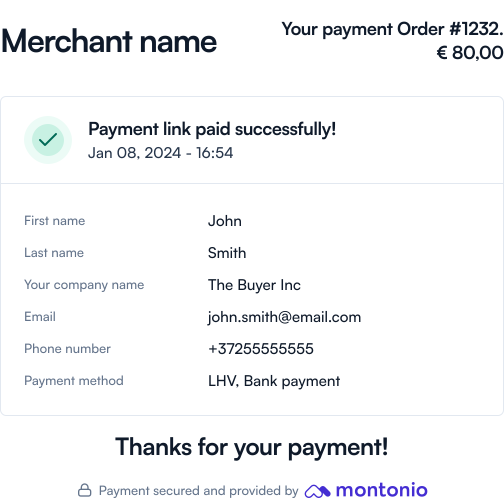
Once the customer completes the payment, they will be redirected back to the payment link gateway where they will be shown a thank you page. If the payment was not successful, they will be given the opportunity to try again.
If you provided a returnUrl in the JWT, the customer will be redirected to this URL instead. In this case, you must build the UI to show a success message or allow the customer to try again, depending on the status of the payment.
Standard thank you page in the Montonio payment link gateway:
Order Token in the return URL
If you provided a returnUrl in the JWT, the customer will be redirected to this URL after the payment, even if it was not successful. The order-token query parameter will be appended to the URL. You can use this token to validate the payment and create the order in your system, or allow the customer to try again. See below for how to validate the token.
Webhook notification
In addition to redirecting the customer, we will send a POST request to the notificationUrl parameter you specified in the Payment link JWT. You can retrieve the orderToken from the request’s body. Validate the contents and the signature of this token to create the order in your system.
🛠️ Testing locally
To test webhooks locally, there are a few options, but currently the easiest one is to use a service like ngrok to expose your local server to the internet or webhook.site for quick troubleshooting.
We have written a more detailed guide in our Help Center. Have a look at it if you need more information.
These are the contents of the webhook:
{ "orderToken": "eyJhbGciOiJIUzI1NiIsInR5cCI6IkpXVCJ9.eyJ1dWlkIjoiYzhlMzZkMTMtNTIzMC00NTczLTk3MGYtMGE3N2ZmODIyYTBjIiwiYWNjZXNzS2V5IjoiWU9VUl9BQ0VTU19LRVkiLCJncmFuZFRvdGFsIjoyMiwibWVyY2hhbnRSZWZlcmVuY2UiOiI5OTk5OSIsIm1lcmNoYW50UmVmZXJlbmNlRGlzcGxheSI6Ijk5OTk5IiwicGF5bWVudFN0YXR1cyI6IlBBSUQiLCJwYXltZW50TWV0aG9kIjoicGF5bWVudEluaXRpYXRpb24iLCJwYXltZW50UHJvdmlkZXJOYW1lIjoiU0VCIEVzdG9uaWEiLCJzZW5kZXJJYmFuIjoiRUU0NzEwMDAwMDEwMjAxNDU2ODUiLCJzZW5kZXJOYW1lIjoiSm9obiBEb2UiLCJjdXJyZW5jeSI6IkVVUiIsIm1lcmNoYW50X3JlZmVyZW5jZSI6Ijk5OTk5IiwibWVyY2hhbnRfcmVmZXJlbmNlX2Rpc3BsYXkiOiI5OTk5OSIsInBheW1lbnRMaW5rVXVpZCI6InlvdXItcGF5bWVudC1saW5rLXV1aWQiLCJwYXltZW50X3N0YXR1cyI6IlBBSUQiLCJpYXQiOjE3MTA0MTk3OTIsImV4cCI6MTcxMDQyMzM5Mn0.PaC-4hfEmK03B9XWrH4hXj81dxvPYNhM03RyPzkjFLA"}See the following section for how to validate the Order Token.
Validating the returned Order Token
The Order Token contains information about the order and the payment.
- In the case of a webhook notification, the
orderTokencan be found in the body of the POST request.
If you decode the token, you will get the following contents:
{ "uuid": "the-montonio-order-uuid", "accessKey": "MY_ACCESS_KEY", "merchantReference": "MY-ORDER-ID-123", "merchantReferenceDisplay": "MY-ORDER-ID-123", "paymentStatus": "PAID", "paymentMethod": "paymentInitiation", "grandTotal": 99.99, "currency": "EUR", // Both senderIban and senderName, will be filled if the bank provides us the info and the order status is "PAID" "senderIban": "EE471000001020145685", "senderName": "John Doe", // Can be string or null. If the payment method is "paymentInitiation" then it contains the bank name used in the transaction. "paymentProviderName": "New Wave Bank Group", "paymentLinkUuid": "payment-link-uuid", "iat": 1632967333, "exp": 1632967333,}The token is signed with your Secret Key and needs to be validated.
See the example below for validating the token:
/* * We recommend using the jsonwebtoken package to verify * Json Web Tokens. You can install it with npm: * > npm install jsonwebtoken * More information can be found at * https://www.npmjs.com/package/jsonwebtoken */import jwt from 'jsonwebtoken';
// fetched from the URL for returnUrl and from POST body->orderToken when it's a notificationconst orderToken = 'eyJhbGciOiJIUzI1NiIsInR5cCI6IkpXVCJ9.eyJ1dWlkIjoiYzhlMzZkMTMtNTIzMC00NTczLTk3MGYtMGE3N2ZmODIyYTBjIiwiYWNjZXNzS2V5IjoiWU9VUl9BQ0VTU19LRVkiLCJncmFuZFRvdGFsIjoyMiwibWVyY2hhbnRSZWZlcmVuY2UiOiI5OTk5OSIsIm1lcmNoYW50UmVmZXJlbmNlRGlzcGxheSI6Ijk5OTk5IiwicGF5bWVudFN0YXR1cyI6IlBBSUQiLCJwYXltZW50TWV0aG9kIjoicGF5bWVudEluaXRpYXRpb24iLCJwYXltZW50UHJvdmlkZXJOYW1lIjoiU0VCIEVzdG9uaWEiLCJzZW5kZXJJYmFuIjoiRUU0NzEwMDAwMDEwMjAxNDU2ODUiLCJzZW5kZXJOYW1lIjoiSm9obiBEb2UiLCJjdXJyZW5jeSI6IkVVUiIsIm1lcmNoYW50X3JlZmVyZW5jZSI6Ijk5OTk5IiwibWVyY2hhbnRfcmVmZXJlbmNlX2Rpc3BsYXkiOiI5OTk5OSIsInBheW1lbnRMaW5rVXVpZCI6InlvdXItcGF5bWVudC1saW5rLXV1aWQiLCJwYXltZW50X3N0YXR1cyI6IlBBSUQiLCJpYXQiOjE3MTA0MTk3OTIsImV4cCI6MTcxMDQyMzM5Mn0.PaC-4hfEmK03B9XWrH4hXj81dxvPYNhM03RyPzkjFLA'
// The Payment link UUID you got from Montonio as a response to creating the payment linkconst paymentLinkUuid = 'the-montonio-payment-link-uuid';
// Use your secret key to verify the orderTokenconst decoded = jwt.verify(orderToken, 'MY_SECRET_KEY'); // can throw
if ( decoded.paymentStatus === 'PAID' && decoded.paymentLinkUuid === paymentLinkUuid && decoded.accessKey === 'MY_ACCESS_KEY') { // payment completed} else { // payment not completed}<?php/** * We recommend using Firebase's php-jwt package to verify * Json Web Tokens. You can install it with composer: * > composer require firebase/php-jwt * More information can be found at * https://github.com/firebase/php-jwt */use \Firebase\JWT\JWT;use \Firebase\JWT\Key;
// Fetched from the URL for returnUrl and from POST body->orderToken when it's a notification$orderToken = 'eyJhbGciOiJIUzI1NiIsInR5cCI6IkpXVCJ9.eyJ1dWlkIjoiYzhlMzZkMTMtNTIzMC00NTczLTk3MGYtMGE3N2ZmODIyYTBjIiwiYWNjZXNzS2V5IjoiWU9VUl9BQ0VTU19LRVkiLCJncmFuZFRvdGFsIjoyMiwibWVyY2hhbnRSZWZlcmVuY2UiOiI5OTk5OSIsIm1lcmNoYW50UmVmZXJlbmNlRGlzcGxheSI6Ijk5OTk5IiwicGF5bWVudFN0YXR1cyI6IlBBSUQiLCJwYXltZW50TWV0aG9kIjoicGF5bWVudEluaXRpYXRpb24iLCJwYXltZW50UHJvdmlkZXJOYW1lIjoiU0VCIEVzdG9uaWEiLCJzZW5kZXJJYmFuIjoiRUU0NzEwMDAwMDEwMjAxNDU2ODUiLCJzZW5kZXJOYW1lIjoiSm9obiBEb2UiLCJjdXJyZW5jeSI6IkVVUiIsIm1lcmNoYW50X3JlZmVyZW5jZSI6Ijk5OTk5IiwibWVyY2hhbnRfcmVmZXJlbmNlX2Rpc3BsYXkiOiI5OTk5OSIsInBheW1lbnRMaW5rVXVpZCI6InlvdXItcGF5bWVudC1saW5rLXV1aWQiLCJwYXltZW50X3N0YXR1cyI6IlBBSUQiLCJpYXQiOjE3MTA0MTk3OTIsImV4cCI6MTcxMDQyMzM5Mn0.PaC-4hfEmK03B9XWrH4hXj81dxvPYNhM03RyPzkjFLA';// The Payment link UUID you got from Montonio as a response to creating the payment link$paymentLinkUuid = 'the-montonio-payment-link-uuid';
// Add a bit of leeway to the token expiration timeJWT::$leeway = 60 * 5; // 5 minutes
// Use your secret key to verify the orderToken$decoded = JWT::decode( $orderToken, new Key('MY_SECRET_KEY', 'HS256'),);
if ( $decoded->paymentStatus === 'PAID' && $decoded->paymentLinkUuid === $paymentLinkUuid && $decoded->accessKey === 'MY_ACCESS_KEY') { // Payment completed} else { // Payment not completed}?>'''We recommend using the PyJWT package to verifyJson Web Tokens. You can install it with pip:> pip3 install PyJWTMore information can be found athttps://pyjwt.readthedocs.io/en/latest/'''import jwt
# Fetched from the URL for returnUrl and from POST body->orderToken when it's a notificationorderToken = 'eyJhbGciOiJIUzI1NiIsInR5cCI6IkpXVCJ9.eyJ1dWlkIjoiYzhlMzZkMTMtNTIzMC00NTczLTk3MGYtMGE3N2ZmODIyYTBjIiwiYWNjZXNzS2V5IjoiWU9VUl9BQ0VTU19LRVkiLCJncmFuZFRvdGFsIjoyMiwibWVyY2hhbnRSZWZlcmVuY2UiOiI5OTk5OSIsIm1lcmNoYW50UmVmZXJlbmNlRGlzcGxheSI6Ijk5OTk5IiwicGF5bWVudFN0YXR1cyI6IlBBSUQiLCJwYXltZW50TWV0aG9kIjoicGF5bWVudEluaXRpYXRpb24iLCJwYXltZW50UHJvdmlkZXJOYW1lIjoiU0VCIEVzdG9uaWEiLCJzZW5kZXJJYmFuIjoiRUU0NzEwMDAwMDEwMjAxNDU2ODUiLCJzZW5kZXJOYW1lIjoiSm9obiBEb2UiLCJjdXJyZW5jeSI6IkVVUiIsIm1lcmNoYW50X3JlZmVyZW5jZSI6Ijk5OTk5IiwibWVyY2hhbnRfcmVmZXJlbmNlX2Rpc3BsYXkiOiI5OTk5OSIsInBheW1lbnRMaW5rVXVpZCI6InlvdXItcGF5bWVudC1saW5rLXV1aWQiLCJwYXltZW50X3N0YXR1cyI6IlBBSUQiLCJpYXQiOjE3MTA0MTk3OTIsImV4cCI6MTcxMDQyMzM5Mn0.PaC-4hfEmK03B9XWrH4hXj81dxvPYNhM03RyPzkjFLA'
# The Payment link UUID you got from Montonio as a response to creating the payment linkpaymentLinkUuid = 'the-montonio-payment-link-uuid'
try: decoded = jwt.decode( orderToken, 'MY_SECRET_KEY', algorithms=['HS256'] )
except jwt.exceptions.InvalidSignatureError as identifier: pass # Token validation failed
if ( decoded['paymentStatus'] == 'PAID' and decoded['paymentLinkUuid'] == paymentLinkUuid and decoded['accessKey'] == 'MY_ACCESS_KEY'): pass # Payment completedelse: pass # Payment not completedThe values for paymentStatus are described here: Lifecycle of an Order.